Resource Configuration Tracking
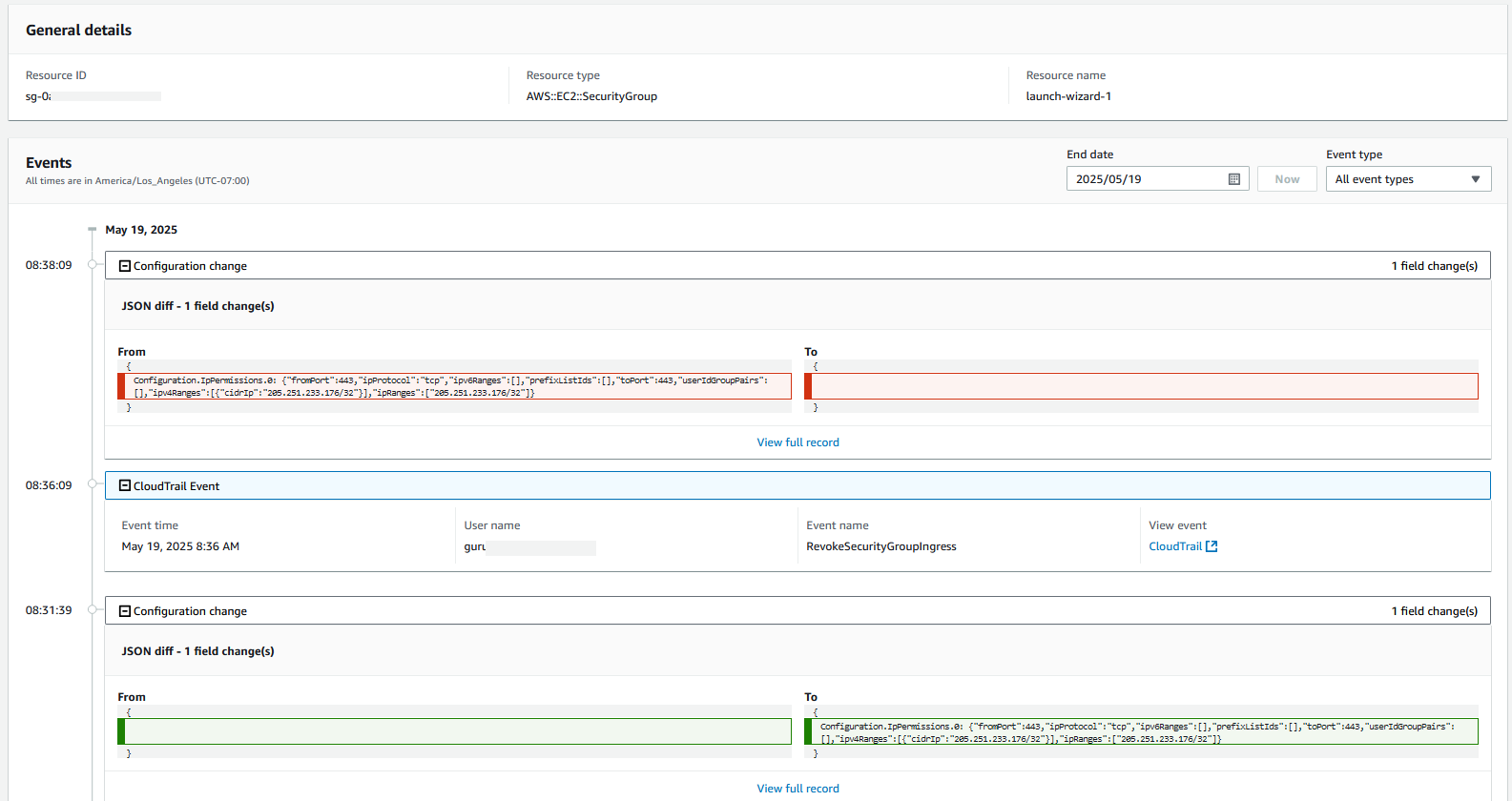
AWS Config records and tracks the configuration of supported AWS resources, creating an inventory of these resources in your AWS account along with their current and historical configurations. It also creates a timeline of configuration changes and maintains detailed information about resource attributes, relationships, and dependencies across your AWS infrastructure. Users can view compliance history and timeline either through the AWS Management Console or programmatically via AWS CLI, with the ability to query specific configuration states at any point in time.
Recording Frequency
AWS Config offers two recording frequency options that impact AWS resource visibility:
Continuous Recording
Continuously monitors and records every configuration change in your AWS environment in real-time. This provides comprehensive visibility into all resource modifications, allowing you to track and audit changes as they occur. Continuous recording is recommended for:
- Production environments with strict compliance requirements
- Critical infrastructure requiring immediate change detection
- Resources subject to regulatory compliance standards
- Security-sensitive workloads
Periodic Recording
Takes daily snapshots of your resource configurations, recording changes only when they differ from the previous 24-hour state. This approach offers a balance between oversight and cost efficiency. Periodic recording is suitable for:
- Development and testing environments
- Non-critical workloads with lower compliance requirements
- Highly dynamic resources (containers, auto-scaling groups)
- Cost-sensitive implementations
For detailed guidance on choosing the appropriate recording frequency, refer to the blog post on Best Practices for Analyzing AWS Config Recording Frequencies. You can create one customer-managed configuration recorder per region per account. The recorder can take a few minutes before configuration changes are captured again after stopping and restarting. Make changes to the configuration recorder during a maintenance window to account for the monitoring gap.
Resource Exclusion
AWS Config offers resource exclusion capability, allowing organizations to strategically manage resources to monitor. By excluding specific resource types that are less relevant to your risk profile or those generating high volumes of configuration items, you can significantly optimize operational noise while maintaining essential security monitoring.
Resource exclusion affects inventory tracking and compliance monitoring. If your environment requires Config for compliance monitoring or detecting shadow IT, approach resource exclusion with careful consideration and proper stakeholder involvement. Organizations should engage their security and operations teams to conduct a thorough assessment of which resources are critical for monitoring and compliance requirements. Before implementing any exclusions, review AWS's Security Best Practices and consult the AWS Well-Architected Framework.
We recommend excluding resource types only when you have a pre-determined steps to monitor for noises in aggregation. Use in conjunction with a solutions like Innovation Sandbox to recycle your accounts on predetermined frequency.
Note: When AWS Config integration is enabled in AWS Control Tower, AWS Control Tower manages a customer-managed Config recorder on enrolled accounts which is protected from modification via SCP. Control Tower account and landing zone lifecycle events (e.g., updates to managed accounts, landing zone updates) reset the recorder configuration via the underlying CloudFormation StackSet, overwriting any exclusions you applied directly. To persist exclusions in Control Tower environments, deploy the EventBridge + Lambda re-application architecture that listens for lifecycle events and re-applies your desired recorder configuration. The GitHub repository provides a ready-to-use template. Verify that exclusions don't disable resource types required by Control Tower's detective controls in any enrolled account. In particular, do not exclude AWS::Config::ResourceCompliance — the Control Tower console relies on this resource type's configuration items as a trigger to update detective control compliance status (see the AWS::Config::ResourceCompliance section below for details).
Using Relationships in Recorded JSON
AWS Config captures resource relationships in the configuration item JSON, providing valuable context about how resources interact. There are two types of relationships:
Direct Relationships
- Straightforward A→B relationship extracted from a resource's configuration data
- Pulled directly from the describe API calls
- Example: The relationship between an Amazon EC2 instance and its security group is direct because the security groups are included in the describe API response for the EC2 instance
Indirect Relationships
- Older resource types might have their configuration recorded by examining multiple resources configurations
- Example: The relationship between a security group and an Amazon EC2 instance is indirect because describing a security group does not return any information about the instances it is associated with. In this case AWS Config creates two configuration items
You can learn more about what resources support indirect relationships and how to disable them in the AWS Config FAQ. Disabling indirect relationships requires opening an AWS Support case — the FAQ provides the exact steps. Note that indirect relationships are being deprecated for new resource types; only the legacy EC2 resource types listed in the FAQ continue to generate indirect CIs.
For details on how many CIs are generated per relationship type and when they are triggered, see the AWS Config FAQ on indirect relationships and the Best Practices for Analyzing AWS Config Recording Frequencies blog post.
AWS::Config::ResourceCompliance
The AWS::Config::ResourceCompliance resource type provides a timeline view of compliance status in the AWS Config console. While it offers valuable insights, it can increase configuration item costs, particularly when evaluating large numbers of resources.
The AWS::Config::ResourceCompliance CI serves a dual purpose in Control Tower environments. Beyond providing historical compliance timeline data directly in AWS Config, it acts as the trigger mechanism for the Control Tower console to update detective control compliance status. The following occurs when ResourceCompliance is excluded from recording:
- Config rules still evaluate resources correctly ✓
- The Config aggregator API still reports correct compliance data ✓
- The Control Tower console does NOT update — the noncompliant resources table remains stale indefinitely
Recommendation: In Control Tower environments with detective controls enabled (e.g., CONFIG.* controls), do not exclude AWS::Config::ResourceCompliance. Instead, consider alternative cost optimization approaches if you rely on the console for noncompliant resource reporting.
For historical compliance checks, you can utilize AWS CloudTrail data as a cost-free alternative. Query CloudTrail logs delivered to Amazon S3 using Amazon Athena, ingest them into Amazon CloudWatch, or third-party solutions. The following query is a sample Athena query:
SELECT
    eventTime, awsRegion, recipientAccountId,
    element_at(additionalEventData, 'configRuleName') as configRuleName,
    json_extract_scalar(json_array_get(element_at(requestParameters,'evaluations'), 0), '$.complianceType') as Compliance,
    json_extract_scalar(json_array_get(element_at(requestParameters,'evaluations'), 0), '$.complianceResourceType') as ResourceType,
    json_extract_scalar(json_array_get(element_at(requestParameters,'evaluations'), 0), '$.complianceResourceId') as ResourceName
FROM your_cloudtrail_athena_table
WHERE eventName='PutEvaluations'
    AND eventTime > '2022-03-17 00:00:00'
    AND eventTime < '2022-03-18 00:00:00'
    AND json_extract_scalar(json_array_get(element_at(requestParameters,'evaluations'), 0), '$.complianceType') IN ('COMPLIANT','NON_COMPLIANT')
Note: Replace
your_cloudtrail_athena_tablewith your Athena table name pointing to your CloudTrail S3 delivery bucket.
Resource Type Coverage
AWS Config continuously expands support for new AWS resource types. Enable automatic inclusion of new resource types in your Config recorder settings to ensure comprehensive coverage as AWS releases new services.
For the complete list of supported resource types, see the AWS Config supported resource types documentation.
AWS Config custom resources
AWS Config allows you to extend its configuration tracking capabilities beyond supported AWS resources through custom config resources. This feature enables you to monitor non-supported AWS resources and track external resources such as on-premises servers, GitHub repositories, and other third-party resources. Once configured, you can publish third-party resource configuration data to AWS Config and view and monitor your complete resource inventory through the AWS Config console and APIs. Additionally, you can evaluate configuration compliance using AWS Config rules, conformance packs, best practices, internal policies, and regulatory requirements.
Follow this blog post to learn how to monitor non-standard features using AWS Config. This blog post provides walk-through on how to monitor resources hosted on other cloud providers.